Razn turns hard questions into issue trees, numbers you can check and a clear recommendation, with an AI team that pauses for your approval at each step.
Free during beta · no card needed · works in any browser, Mac app too
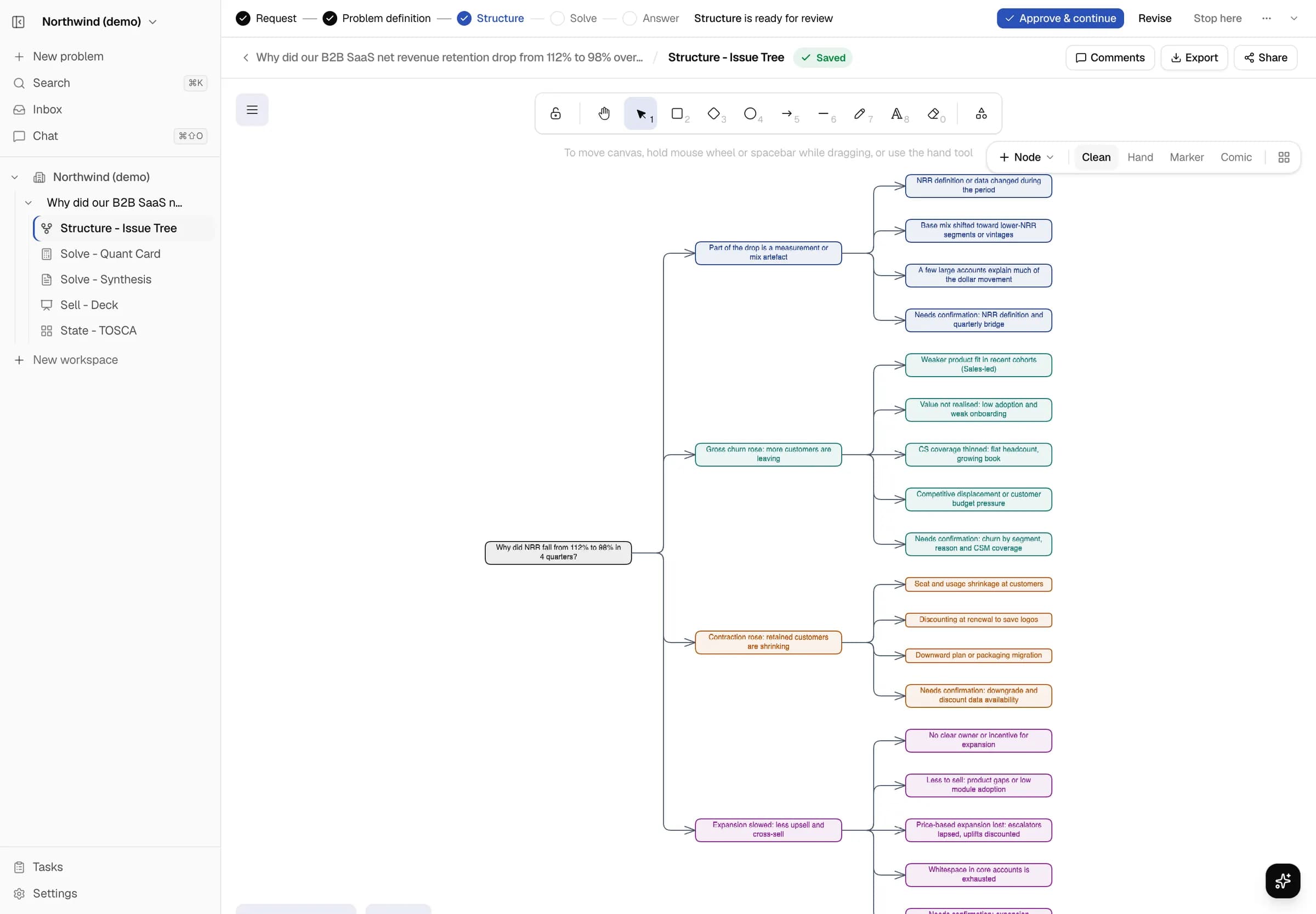
A real case in Razn, paused after the Structure step. Demo company, illustrative numbers.
Made for the decisions that matter
Pricing decisions
Why a metric dropped
Expand, launch or enter a market
Cost-cutting priorities
Investment and build-vs-buy screening
Board and leadership memos
Built on the methods top problem-solvers trust
TOSCAproblem definition
MECEissue trees
Hypothesis-drivenanalysis
SCQAstorylines
Pyramid Principledecks
How it works
The method top problem-solvers use, with an agent doing the legwork
Five steps the best problem-solvers follow. After each one the agent stops and shows you its work. Approve it, revise it, or stop there.
Step 1
Request
Your ask
Describe the problem however rough it is. Attach the context docs you already have.
Step 2
Problem definition
TOSCA
Trouble, Owner, Success criteria, Constraints, Actors. The agent asks for what's missing.
Waits for your approval
Step 3
Structure
Issue tree
A MECE issue tree on a canvas you can edit: hypotheses, drivers, and the test for each.
Waits for your approval
Step 4
Solve
Quant card + synthesis
Named drivers, formulas and bear/base/bull scenarios, written up as findings.
Waits for your approval
Step 5
Answer
Deck
An action-titled storyline in Pyramid order, exported to PowerPoint or PDF.
Start anywhere
Not every problem needs all five steps. Pick the door that matches where you are; you can add the others later from the case bar.
Full case
Start from a rough ask. Razn defines the problem with you before structuring anything.
Defined problem
Already know the question? Skip straight to the issue tree.
Slides
Have the storyline? Paste the brief and go straight to the deck.
Features
Everything a hard problem needs, in one place
Transparent by design
It shows its reasoning, not just its answer
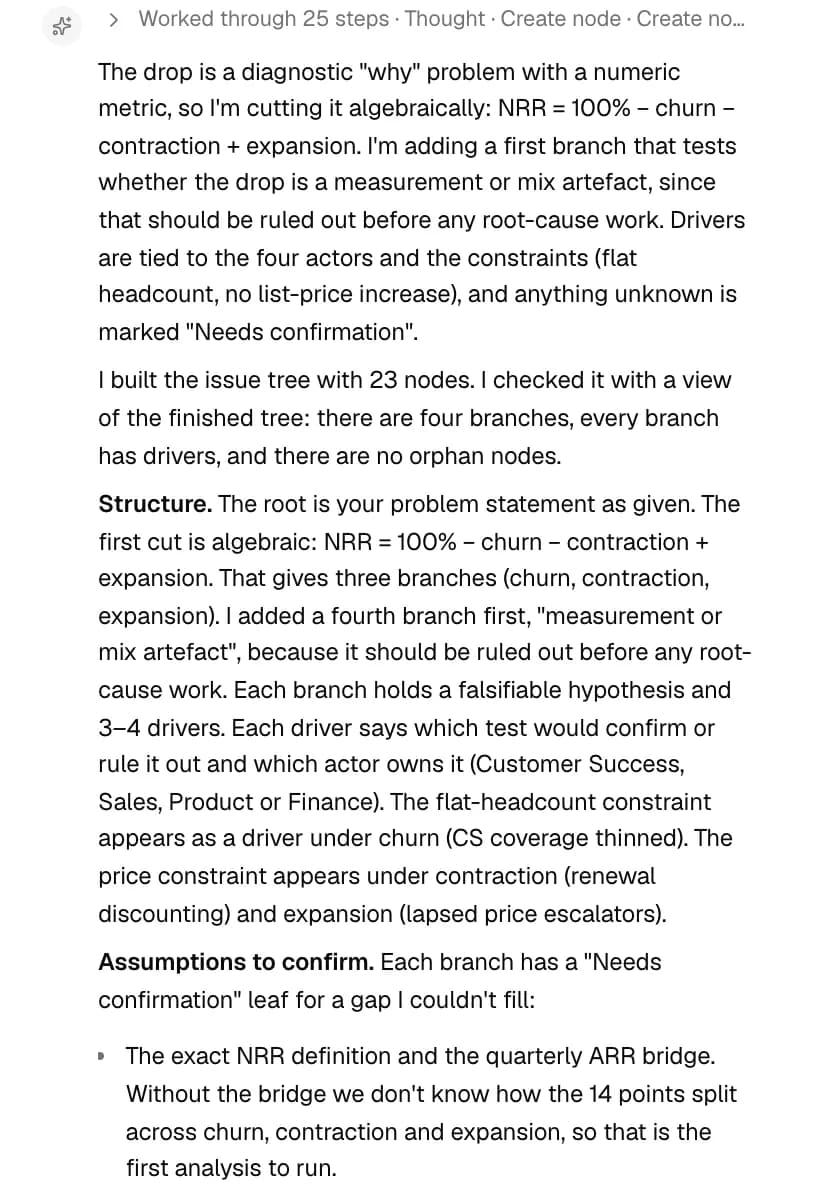
After every step the agent explains how it cut the problem, what it assumed, and which gaps it couldn't fill. Every change it made to your work is listed, so you can check it before you approve.
Assumptions flagged as “needs confirmation”, never buried
Each action on your artifacts is inspectable
Revise in plain language, or edit the artifact yourself
No black boxAssumptions flaggedThe agent's write-up after the Structure step.
Multi-agent team
A specialist team, not a single chatbot
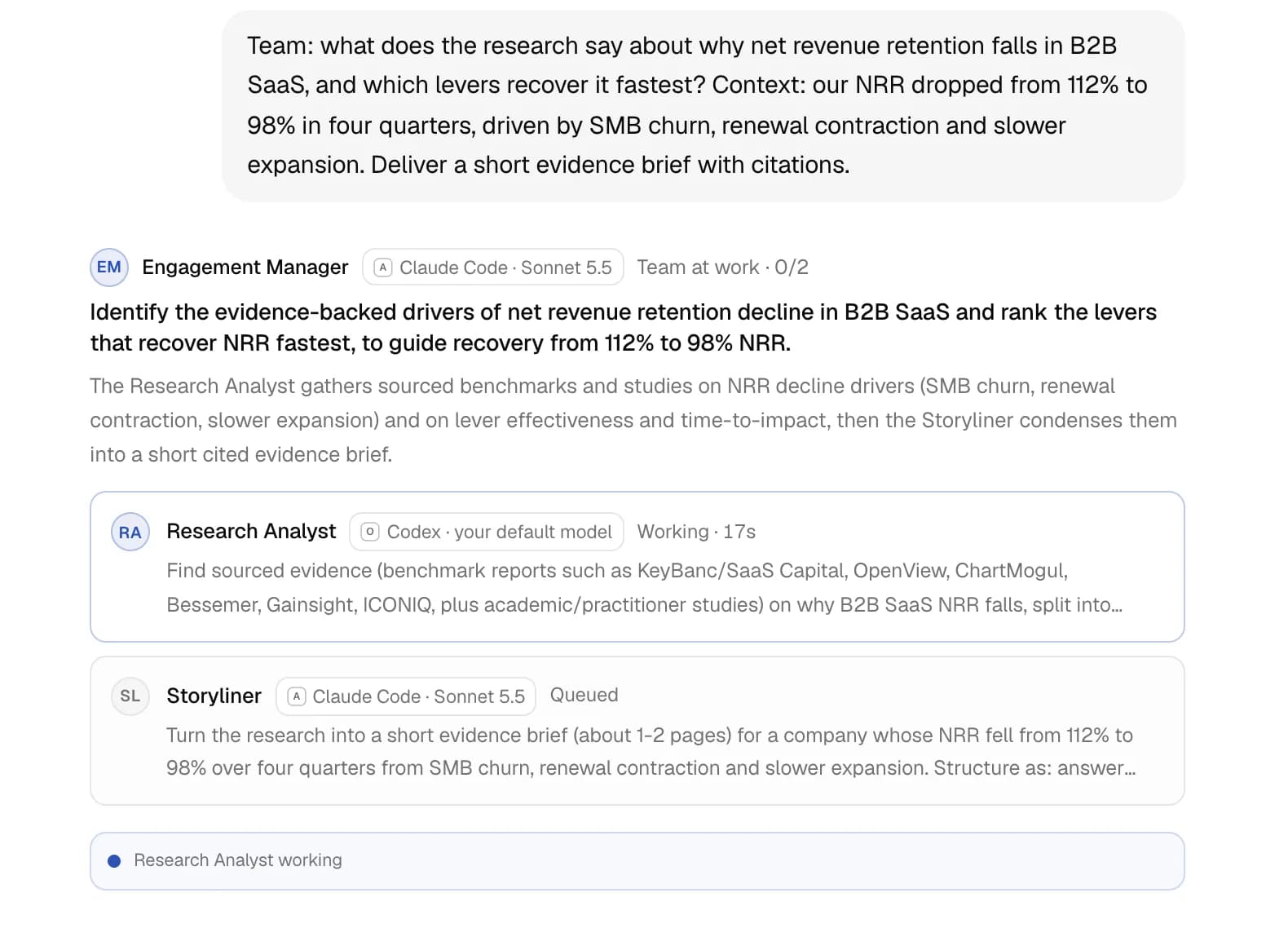
An Engagement Manager plans the work and briefs specialists: a Research Analyst, a Problem Solver, a Quant Analyst and a Storyliner. They work in parallel and hand back one synthesis with the deliverables attached.
Pick the model per role: Claude, GPT, Gemini or Grok
See who did what, and which sources they used
Deliverables land as real artifacts: trees, docs, decks
Engagement ManagerModel per roleA team run on the demo case: each specialist runs on its own model.
Research mode
Answers you can cite
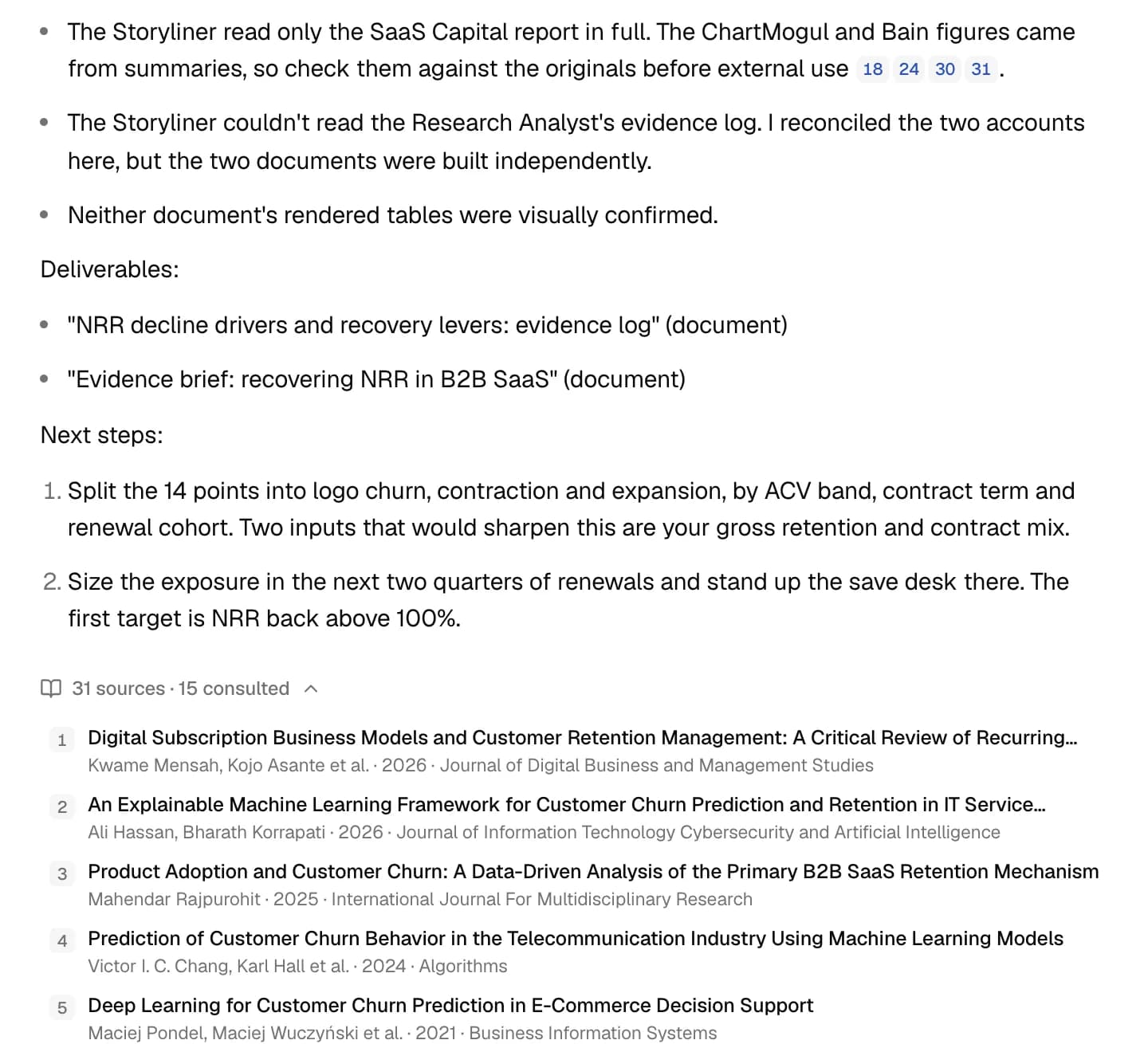
Research mode searches academic papers through OpenAlex, arXiv and Semantic Scholar, plus the open web, and links each claim to its source. Confidence and open gaps are stated, not implied.
The end of a research answer: caveats, citations and the paper list.
Chat that builds
Just chat, and get artifacts back
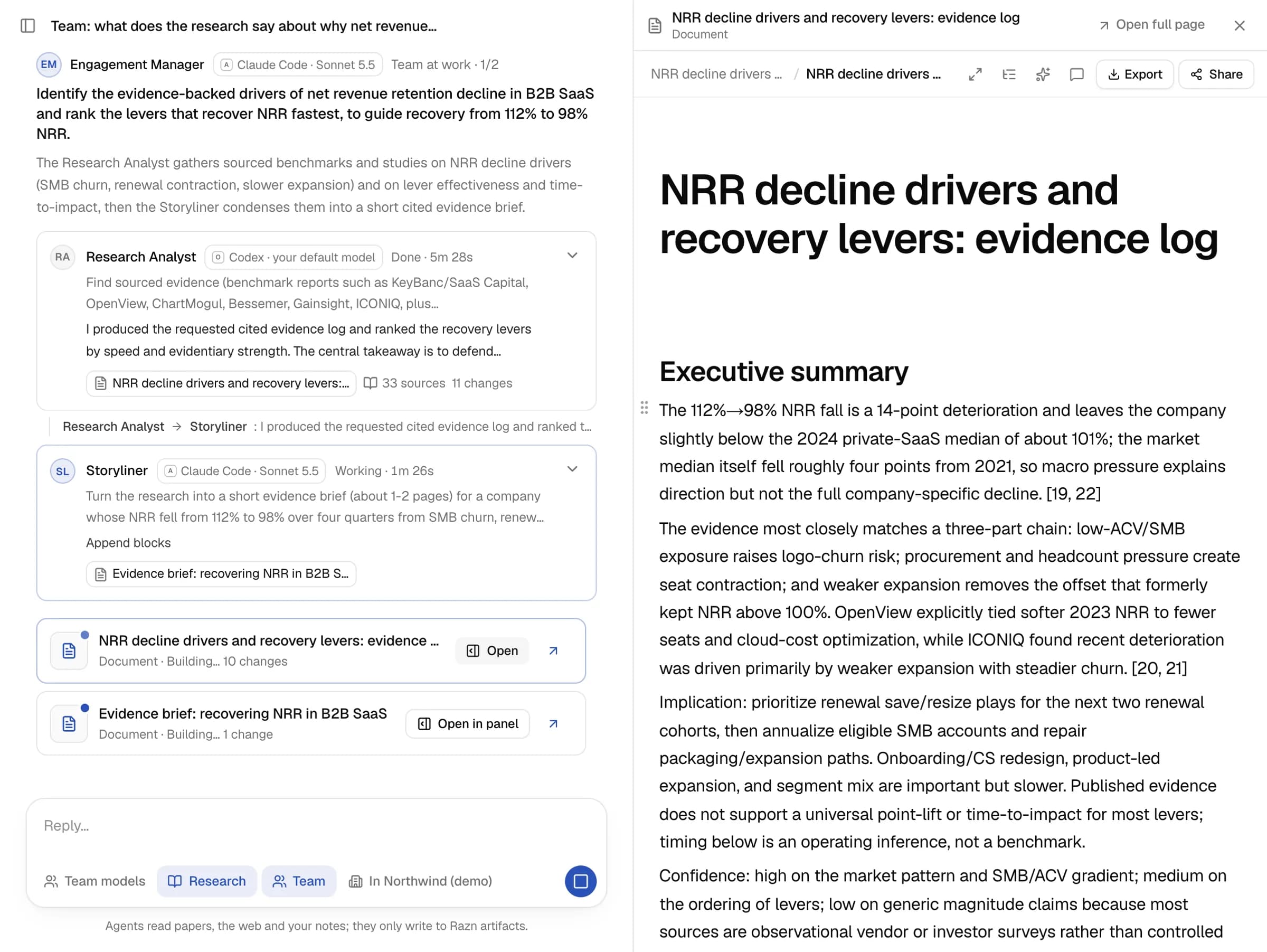
Talk to Razn the way you would to any AI assistant. When the answer deserves to be an issue tree, a document or a deck, the agent builds it in a panel beside the conversation, ready to edit.
Chat on the left; the document the agents are writing, citations included, on the right.
The answer
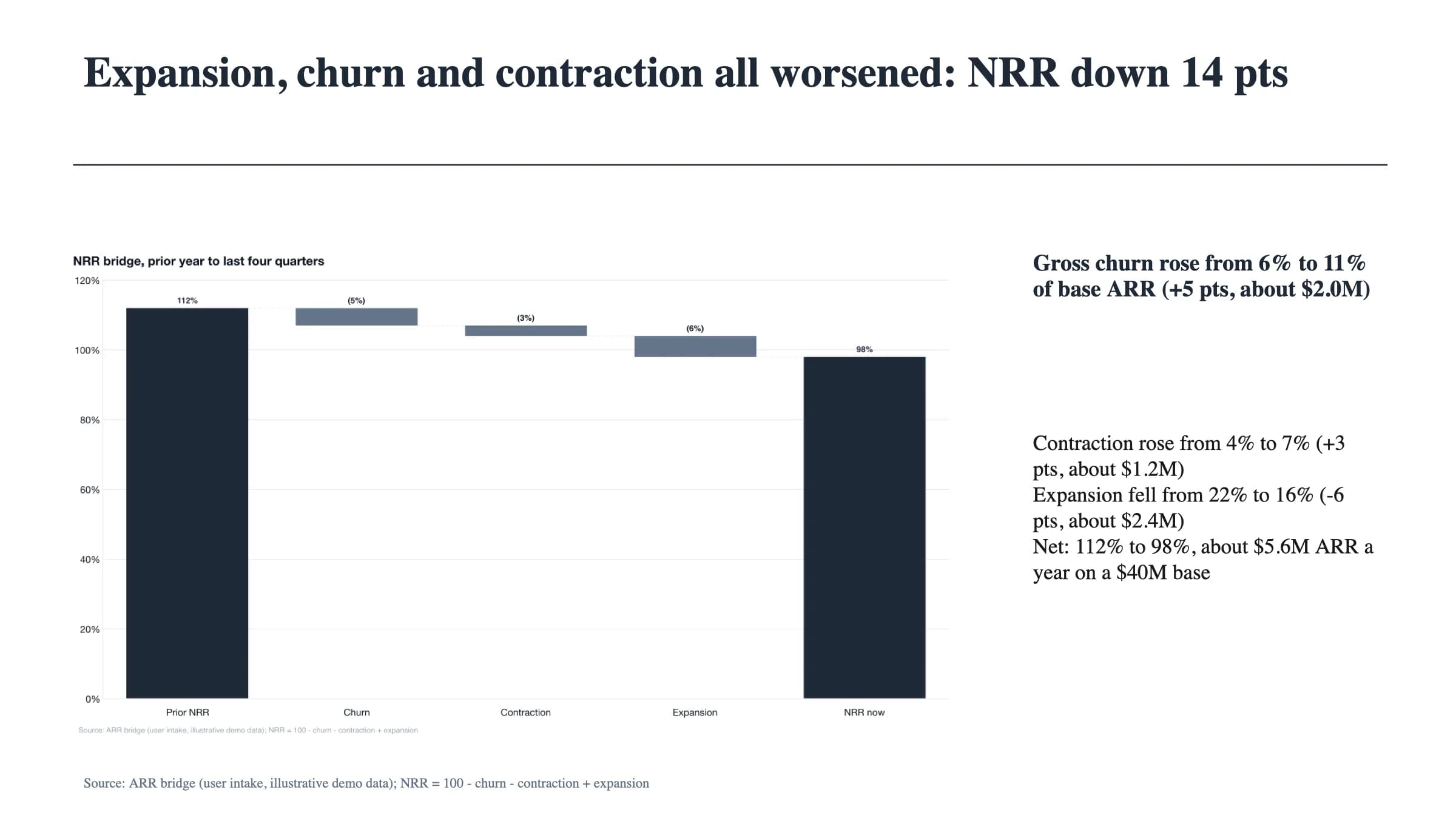
End in a deck that holds up in the room
The storyline follows the Pyramid Principle: an action title on every slide, evidence underneath. Export to PowerPoint or PDF and keep editing in the tools your client uses.
Slide 4 of 12 from the exported PowerPoint (rendered in macOS Quick Look). Demo company, illustrative numbers.
Ask Razn anywhere
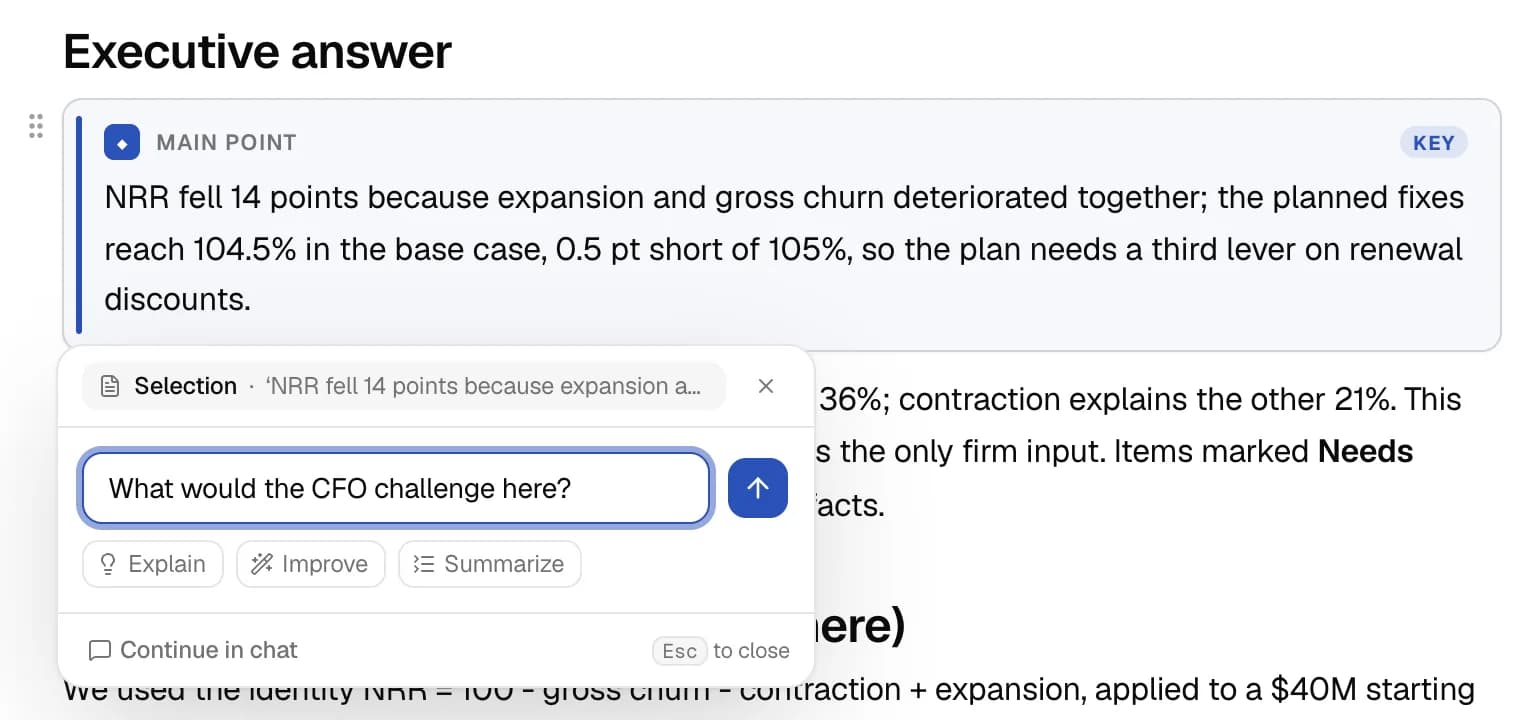
Select anything, press ⌘J
Highlight something in a doc, a deck or a model and ask about it in place: explain it, improve it, or pressure-test it. Continue in chat when it needs more room.
⌘J on a selected block in the synthesis doc.
An infinite canvas
Issue trees on an Excalidraw-based canvas. Clean, hand-drawn or marker styles; tidy the layout in one click.
Docs that argue
A block editor with argument blocks like Main Point and Situation, Complication, Resolution.
Quant cards
Named drivers and formulas with bear, base and bull scenarios, so every number traces to an assumption.
35 frameworks
From SWOT and Porter's Five Forces to profit trees and unit economics, ready to fill or hand to the agent.
Comments and tasks
Comment on any artifact, assign follow-ups, and track them in one inbox.
Workspaces
Keep each client or project in its own workspace, with shareable links when you need a second opinion.
Why not just use a chat window?
General AI chat gives answers. Hard decisions need a process.
Chat assistants are excellent at replying. Razn uses the same frontier models, and wraps them in the method, the artifacts and the review steps that turn a reply into a recommendation.
General AI chat compared with Razn, by part of the workflow
Part of the workflow
General AI chat
Razn
What you get back
What you get backA long reply to copy somewhere else
What you get backArtifacts you keep editing: issue tree, model, memo, deck
How the thinking happens
How the thinking happensIn one reply, with nothing to sign off along the way
How the thinking happensFive explicit steps, each paused for your review
Structure
StructureWhatever shape the reply takes
StructureA MECE issue tree you can see, edit and challenge
Sources
SourcesDepends on the tool and the prompt
SourcesResearch mode cites papers and web pages, claim by claim
Models
ModelsUsually one vendor's models
ModelsChoose Claude, GPT, Gemini or Grok, per role
The last mile
The last mileYou rebuild it as slides
The last mileAction-titled deck, exported to PowerPoint or PDF
⌥Option
⇧Shift
RR
Why are Q3 enterprise renewals slipping?
From any app→ a new case
Razn for Mac
Catch the problem the moment it shows up
The Mac app is the full Razn workspace in its own window, plus three things a browser tab can't do.
Capture from any app
Press ⌥⇧R anywhere on your Mac. A small panel opens; type the problem and the case starts.
Your case in the menu bar
See the case in progress and the step it's on, or start a new one, without switching windows.
A nudge when it's your turn
Get a notification when a step finishes and is waiting for your review.
Universal build for Apple silicon and Intel, macOS 12 or later. Sign in with your Razn account. On Windows or Linux, use Razn in any browser: same workspace, same account.
Free beta
Free during beta. Everything included.
No tiers, no feature gates and no card. Razn is the workspace; you bring the AI models.
About AI usage
Razn runs on the model access you already have: connect a Claude or ChatGPT plan, or API keys for Anthropic, OpenAI, Google or xAI. Your provider bills that usage at their own prices.
Razn
No card needed
Freeduring beta
The full case flow: problem definition, issue tree, solve, deck
Chat and Research mode with cited papers and web sources
The multi-agent team, with a model choice per role
Issue-tree canvas, docs, quant cards and 35 frameworks
Create an account and start. Every feature is unlocked.
FAQ
Questions, answered straight
Is Razn free?
Yes. Razn is free during beta: create an account and every feature is unlocked, no card needed. The AI models run on access you connect yourself, which your provider bills at their own prices.
Do I need my own AI model access?
Yes. Razn runs on model access you connect in Settings: a Claude Pro or Max plan, a ChatGPT Plus, Pro or Team plan, or API keys from Anthropic, OpenAI, Google, xAI, DeepSeek, Moonshot or OpenRouter. Your provider bills that usage directly, at their prices.
Which models can I use?
Claude, GPT (including Codex), Gemini and Grok, plus DeepSeek, Kimi and anything on OpenRouter. Set a default, then pick a different model for each role on the team if you like, for example one model for research and another for the numbers.
What can the agents read and change?
Agents read research sources (papers and web pages) and the notes, documents and context you give them. They only write to Razn artifacts in your workspace: issue trees, documents, quant cards and decks. They don't send email, post anywhere or change anything outside Razn.
Where does my data go?
Your workspace lives in Razn. When an agent works on a step, the relevant content is sent to the model provider you chose, under your own plan or key, so that provider's data terms apply to it.
What can I export?
Decks export to PowerPoint (PPTX) and PDF. Documents export to Word. When you generate a deck from a brief, Razn can also produce an Excel model and a Word annex alongside it.
Is there a Mac app? What about Windows?
Yes: a universal Mac app for Apple silicon and Intel, with the ⌥⇧R quick-capture shortcut, menu-bar case status and step notifications. On Windows and Linux, Razn runs in the browser.
Who is Razn for?
Anyone who has to turn a hard, ambiguous question into a decision they can defend: founders, operators, investors and managers. Typical uses: pricing decisions, why a metric dropped, whether to expand, launch or enter a market, cost-cutting priorities, investment and build-vs-buy screening, and board or leadership memos.