FrameworksNovember 12, 20266 min read
MoSCoW Prioritization: How to Decide What Makes the Cut (Worked Example)
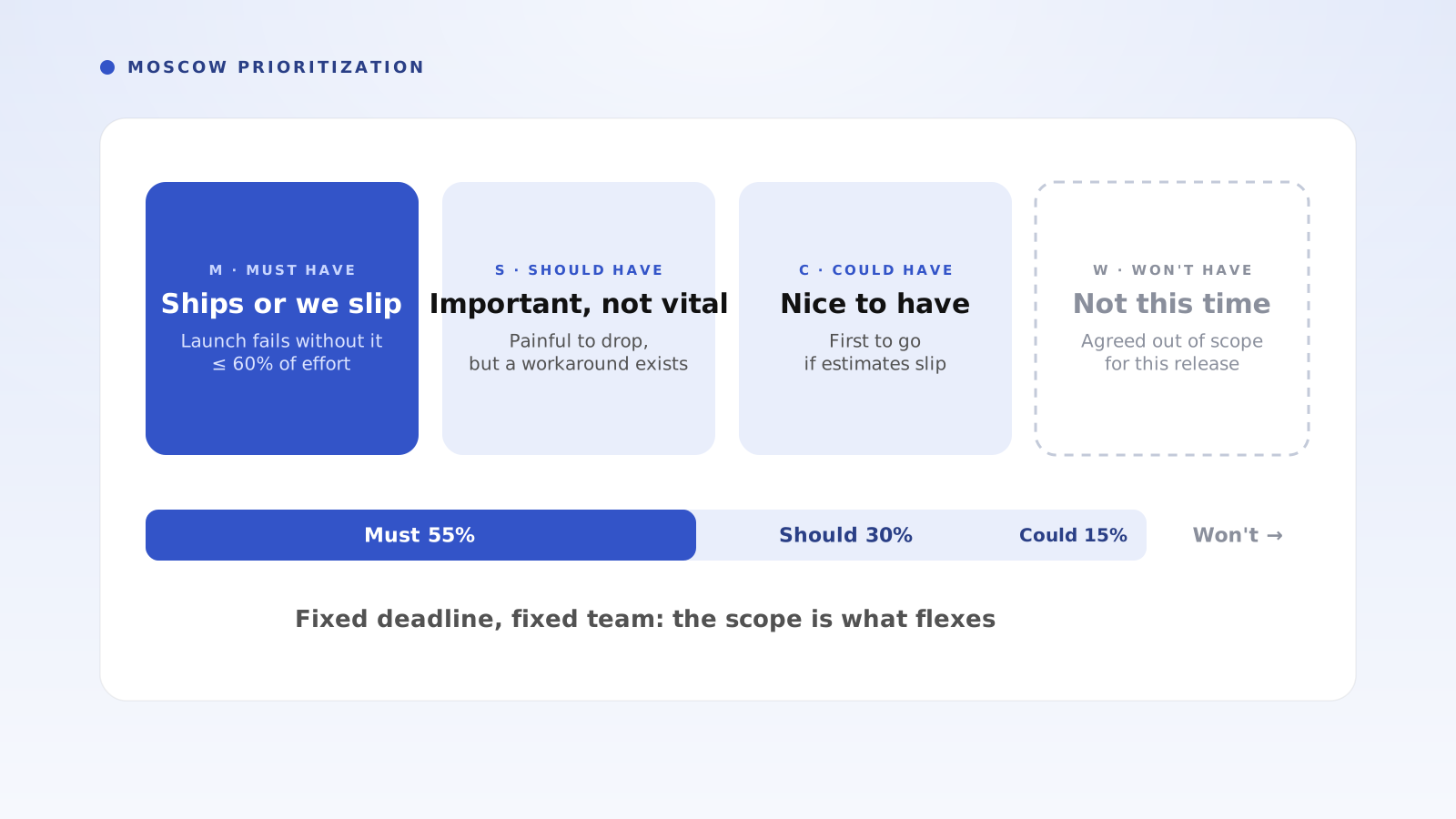
MoSCoW prioritization sorts every requirement into Must have, Should have, Could have and Won't have, so a fixed deadline and budget decide the scope instead of the loudest voice. Here's how each category works, the steps, and a worked example with 14 features and 40 developer-days.
What Is MoSCoW Prioritization?
MoSCoW prioritization is a method for deciding scope when the deadline and budget are fixed. You sort every requirement into four categories: Must have, Should have, Could have and Won't have. The Musts get guaranteed capacity, the Coulds act as a buffer, and the Won'ts are agreed out of scope in writing, so the date holds and everyone knows what was cut.
The method comes from Dai Clegg at Oracle in 1994 and was later built into the DSDM agile framework. The lowercase o's are only there to make the acronym pronounceable. It works for a product release, a project phase, a migration, an event or any initiative where time is fixed and the scope has to flex.
What Do Must, Should, Could and Won't Have Mean?
Each category answers one question: what happens if this item is not delivered by the deadline?
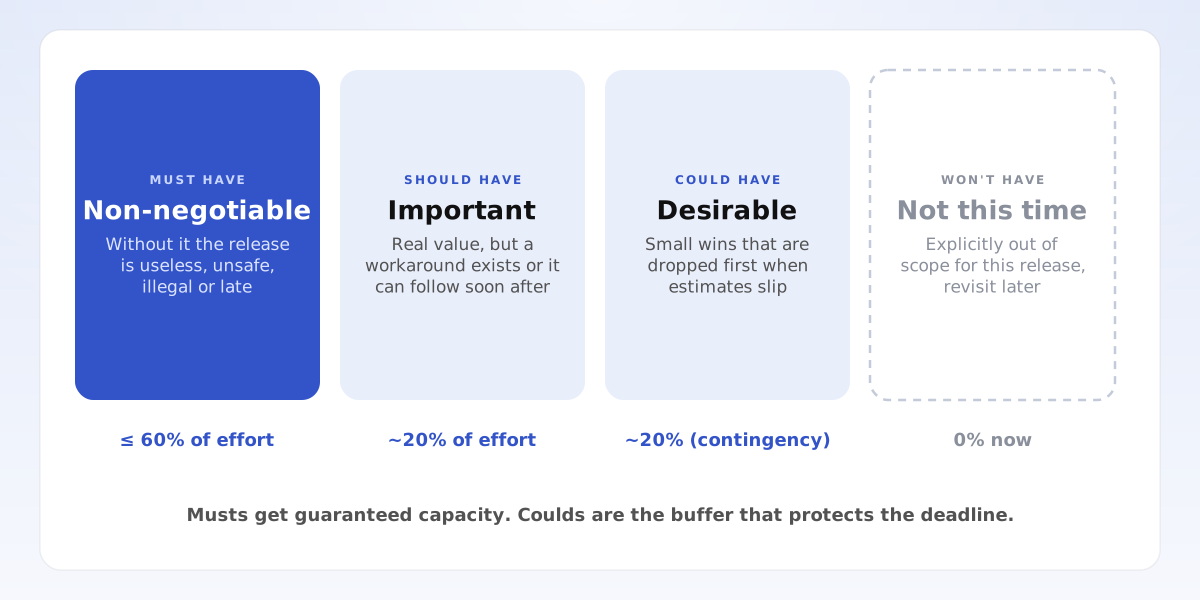
- Must have: the release fails without it. It would be useless, unsafe, non-compliant or pointless to ship. A good test: would you move the deadline rather than ship without it? If not, it is not a Must.
- Should have: important and valuable, but there is a workaround or it can follow shortly after. Dropping it hurts, but the release still works.
- Could have: nice to have, with small impact if left out. Coulds are the first items dropped when estimates slip.
- Won't have (this time): explicitly out of scope for this release. Writing it down stops it from creeping back in and records it for later.
- The 60% rule: Musts should take no more than about 60% of the available effort, with the remaining 40% split between Shoulds and Coulds. Above 60%, any overrun lands on a Must and the deadline slips.
How Do You Use the MoSCoW Method Step by Step?
1. Fix the timebox and the capacity. Write down the deadline and the effort available, such as 40 developer-days before launch. MoSCoW only works when time is fixed and scope can move.
2. List every candidate item with an effort estimate. Use one unit for everything (days, points or cost) so the buckets can be added up.
3. Agree the definition of Must before sorting. Use the deadline test: an item is a Must only if you would delay the launch rather than ship without it.
4. Sort each item into Must, Should, Could or Won't. Start everything as Won't and make each item earn its way up, which stops the list from filling with Musts.
5. Check the totals against capacity. Musts at or under 60%, Musts plus Shoulds at about 80%, and Coulds filling the rest. If Musts are over 60%, split items into a Must core and a Should extension, or move the deadline now rather than later.
6. Publish the Won'ts and set a re-sort rule. Share what was cut and why, and agree in advance that any overrun is paid for by dropping Coulds first, then Shoulds.
Worked Example: What Makes the Cut for a 40-Day Launch?
A team building invoicing software is launching a self-serve plan on a fixed date. Between now and then it has 40 developer-days of capacity. The wish list from sales, support and the founders has 14 features adding up to 58 days, so 18 days of work cannot fit.
Musts total 22 days, or 55% of capacity: self-serve sign-up (5 days), card payments (6), create and send invoice (5), password reset (2) and account data export (4), which customers' contracts require. Without any one of these, the self-serve plan cannot launch.
Shoulds total 12 days, or 30%: overdue invoice reminders (4), an onboarding checklist (3), invoice templates (3) and basic usage analytics (2). Each matters, but customers can work around them for a few weeks.
Coulds total 6 days, or 15%: client CSV import (3), dark mode (2) and Slack alerts (1). Musts, Shoulds and Coulds add up to exactly 40 days.
Won'ts total 18 days: an accounting integration (10) and multi-currency support (8). Both are valuable, but neither is needed for the first self-serve customers, so they go on the next release's list with a note on why.
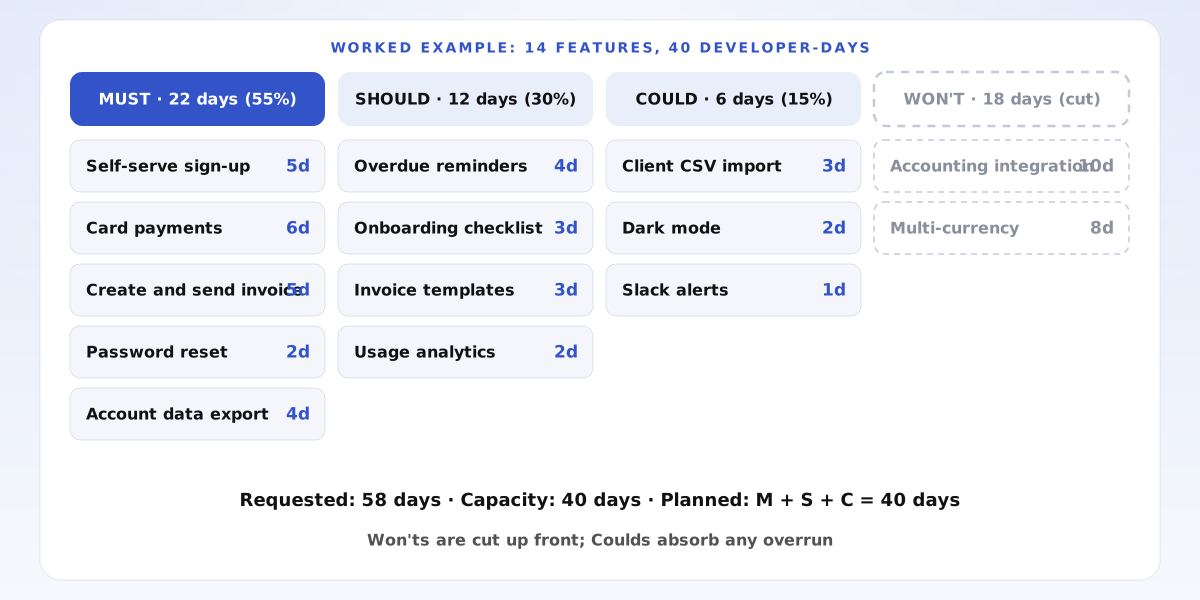
- Requested: 58 days. Capacity: 40 days
- Must: 22 days (55%), under the 60% ceiling
- Should: 12 days (30%). Could: 6 days (15%)
- Cut up front: accounting integration and multi-currency, 18 days
What Happens When Estimates Slip?
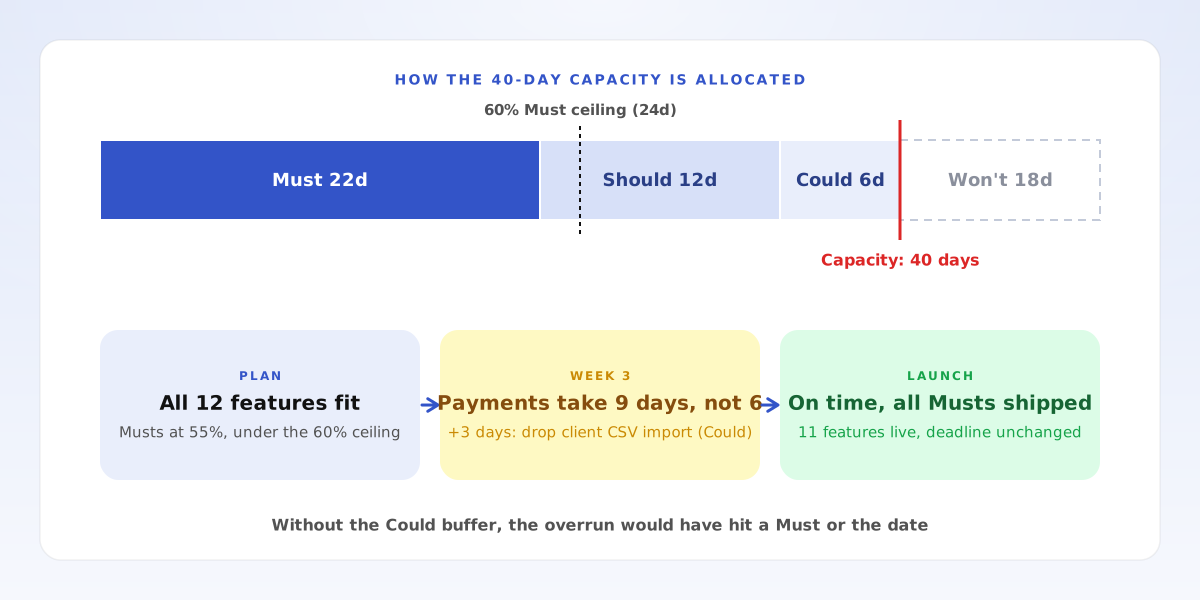
In week three, card payments turn out to need 9 days instead of 6. Because the re-sort rule was agreed in advance, nobody argues about it: the team drops client CSV import, the largest Could, and gets the 3 days back. The launch ships on time with all five Musts, all four Shoulds and two of the three Coulds.
If Musts had taken 36 of the 40 days, the same 3-day overrun would have left no buffer, and something critical or the date itself would have given way. That is what the 60% rule protects against.
MoSCoW vs RICE: Which Should You Use?
Use MoSCoW when the deadline is fixed and the question is what fits. Use the RICE scoring model when there is no single deadline and you need to rank a long backlog by value per unit of effort. They work well together: RICE scores help you decide which Shoulds and Coulds to keep, and MoSCoW turns the ranking into a scope that fits the timebox.
For other prioritization questions, pick the tool that matches the decision. The Eisenhower matrix sorts your own tasks by urgency and importance. An impact effort matrix finds quick wins in a list of ideas. The 80/20 rule finds the few causes behind most of a result. A decision matrix compares a handful of options across several criteria. And every Must you add has an opportunity cost: the Should or Could it pushes out.
What Are Common MoSCoW Mistakes?
Everything becomes a Must. If Musts pass 60% of effort, the method stops protecting the deadline. Apply the deadline test to each one and split large items into a Must core and a Should extension.
No effort estimates. Without numbers, the buckets are opinions and you cannot check them against capacity. Rough estimates in days are enough.
Treating Won't as never. Won't means not in this release. Keep the list and review it when you plan the next one.
Deciding the re-sort rule too late. Agree before work starts that overruns are paid for with Coulds first. Arguing about it in week three costs time you do not have.
Frequently Asked Questions
What does MoSCoW stand for? Must have, Should have, Could have and Won't have (this time). The o's are added to make it pronounceable.
What percentage should be Must haves? No more than about 60% of total effort. A common split is 60% Must, 20% Should and 20% Could.
Is MoSCoW only for software? No. It works for any fixed-deadline scope decision, such as a store opening, an event, a system migration or a regulatory deadline.
Who decides what is a Must? The person accountable for the outcome, usually the product or project lead, after hearing stakeholders. Agree the definition of Must first so the sorting is consistent.
How Does Razn Help With Scope Decisions?
Razn is an AI workspace that turns a messy business problem into a structured issue tree, testable hypotheses and an answer-first document. Use it before you sort a backlog, when the real question is still fuzzy, such as "what does this launch actually need to achieve?": break the goal into its drivers in Razn, test which features move them, and write up the scope decision with the reasoning attached. To learn the structure first, see issue trees. Razn is free during beta.
- Fix the deadline and capacity first, then let scope flex
- Keep Musts at or under 60% of effort
- Use Coulds as the buffer and drop them first
- Write down the Won'ts so they stay out of this release


